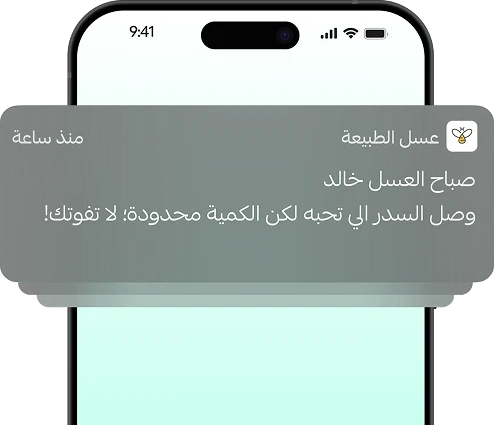
An unbreakable bond
With unlimited free notifications, you will always have the edge over your competitors and the greatest influence on the customer's decision.

An unmatched user experience
We offer you the experience of building a Native app, compatible with Android and Apple, for a completely seamless and fast user experience for your customers!

Comprehensive statistics
From app sales and downloads to tracking the complete customer journey, detailed on a single page within your store.

Diverse marketing tools
With coupons, offers, exclusive products, and automated notifications, you will have integrated tools for successful marketing right at your fingertips.


Zendesk

Adjust

Intercom

Firebase

Customer loyalty

Smartlook

Size Chart


Retail stores





What are the steps to create an electronic application on the app builder?

1- Design your store application with easy drag-and-drop technology, and preview your designs until you find the perfect layout for you. (You can change the design whenever you want!)
2- Subscribe to the App Maker from your store's control panel.
3- Fill in all the required details related to the electronic app stores, Google Play and the App Store, then click on Publish Application.
4- The review phase will be conducted by the Salla team, during which:
- If the merchant has company-type accounts in the Google Play and App Store: We will review the application and the entered accounts within 2-7 days and contact the merchant to log into them so we can upload the merchant's Salla application to the app store. After obtaining approval, we will publish the application and notify you. (Note: The Apple account must be of the Enterprise type and must be linked to the store's commercial register).
- If the merchant does not have accounts in the Google Play and App Store: We will set up the developer account with the merchant after reviewing their Salla app data and contacting the merchant to verify their information. This process takes from two weeks to a month depending on Google and Apple policies. After the account is activated, the application will be prepared by Salla for review by the app stores and transferred to the merchant in a process that takes from 2 to 7 days.
Do I need to re-enter my store products again in the app?
No, you do not need to do that, as your online store's control panel is linked to the app maker's control panel; you will be able to customize the appearance of products in both the store and the app, or restrict them to only one of them.
Is the application service fee paid only once?
The value of the mobile application creation service is 500 SAR for a monthly subscription or 5500 SAR for an annual subscription, and it is separate from the store subscription on the Salla platform. The service includes application maintenance, operation, and all additions, updates, and new features throughout the year.
The subscription fees for the Salla App Maker do not include any fees charged by Apple or Google Play, which are an annual subscription fee of (99) dollars for the Apple platform and a one-time fee of (25) dollars for the Google Play platform.
Can I edit the store app design after publishing it?
Yes, you can do this by logging into your store's control panel, then heading to the Salla App Maker page. From there, you will see the section dedicated to designing your store's app. Modify any elements you want from there to automatically update the app's design to the new look for your customers, and without any additional fees!
Does Salla create a developer account for me if I do not have one?
Yes, Salla creates a developer account for the store on Apple and Google for an additional fee of 990 SAR, or the merchant can create the account themselves, and Salla will provide them with all the details, step-by-step, through educational videos and Help Center articles.
Are notifications free after creating the store app?
Yes, app notifications are free and unlimited. You can send two types of notifications:
1- Instant or scheduled notifications: In which you can write any notification for your customer, whether it is marketing or even "Good morning", with the possibility of attaching an image with the notification.
2- Automated notifications: These are notifications sent automatically to your customer without your intervention after setting them up once, such as order tracking notifications, abandoned cart notifications, product availability notifications .. and others
Does it require a subscription to the Salla platform to be able to create an electronic application?
Yes, it requires you to subscribe to one of Salla's paid packages, Plus or Pro.
Does the app service include any updates and additional features?
Yes, the application will be developed with new features and characteristics periodically, and your application will be updated whenever any new feature or characteristic is added.